The Cricut Design Space Templates are BACK!

I just found out minutes ago that with the latest Cricut update the Design Space Templates are BACK!
I can tell you how excited I am for this update. For those who don't know what I am talking about. In the previous Cricut Design space software, they had these cool templates that you could choose from. They didn't affect the image and wouldn't show up when you printed or cut. They were more like watermarked the template image on your design space mat to help you to decide on the sizing and placement of your designs before officially cutting them out.

I used this feature a lot when making custom t-shirts since you could not only choose their t-shirt template, but you could also choose if you wanted a men's, women's, toddler etc shirt and which size of shirt. (Click here for the DIY to make this P.S. I Love you Shirt)
As soon as I heard that the Templates were back in Design Space I just had to rush over to check it out. I have to say the new templates are little different than the old ones but don't worry they still are as amazing as they were before. Let me show you how they work. **Templates are currently only available on the Desktop version of Design Space NOT the Apps. Hopefully, that will happen soon.
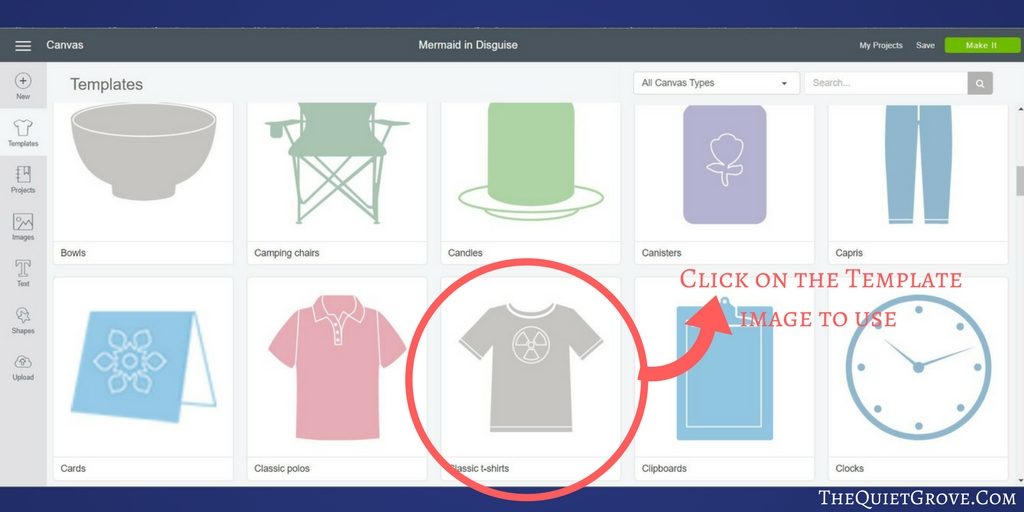
- Step one.: Open Design Space and click on the Template icon on the left-hand tool bar. (To access this specific Design Template go here)

- Step Two: Choose your desired template for the project you are making.
- Step Three: Click on the Template icon on the bottom of the Right-hand tool bar to adjust template sizing (ie shirt size) **This is what the template looks like on a blank canvas

- Step Four: Place your design over the watermarked template to better adjust sizing and placement.

Yet it is that simple. No more wondering how big or small you need to make your design to fit on your Kitchen Aid mixer, or kids t-shirt or banner etc,. Cricut is really trying to make the whole experience of crafting with their amazing machines as easy as possible. (You can check out some of my DIY Projects and Free SVG Cut Files Here)
If you have more questions on the newly released Templates for Design Space, Cricut help can answer your questions (or just ask in the comments of this post and I can help you out!
If you don't have a Cricut Machine yet I have the Cricut Explore Air 2 and love it. They also just came out with a new Machine called the Cricut Maker which is more powerful and has special new blades that you can use with it to cut Fabric etc. Check it out here.
IF
If you liked this post, then check these out: (Click on the photos to go the posts)