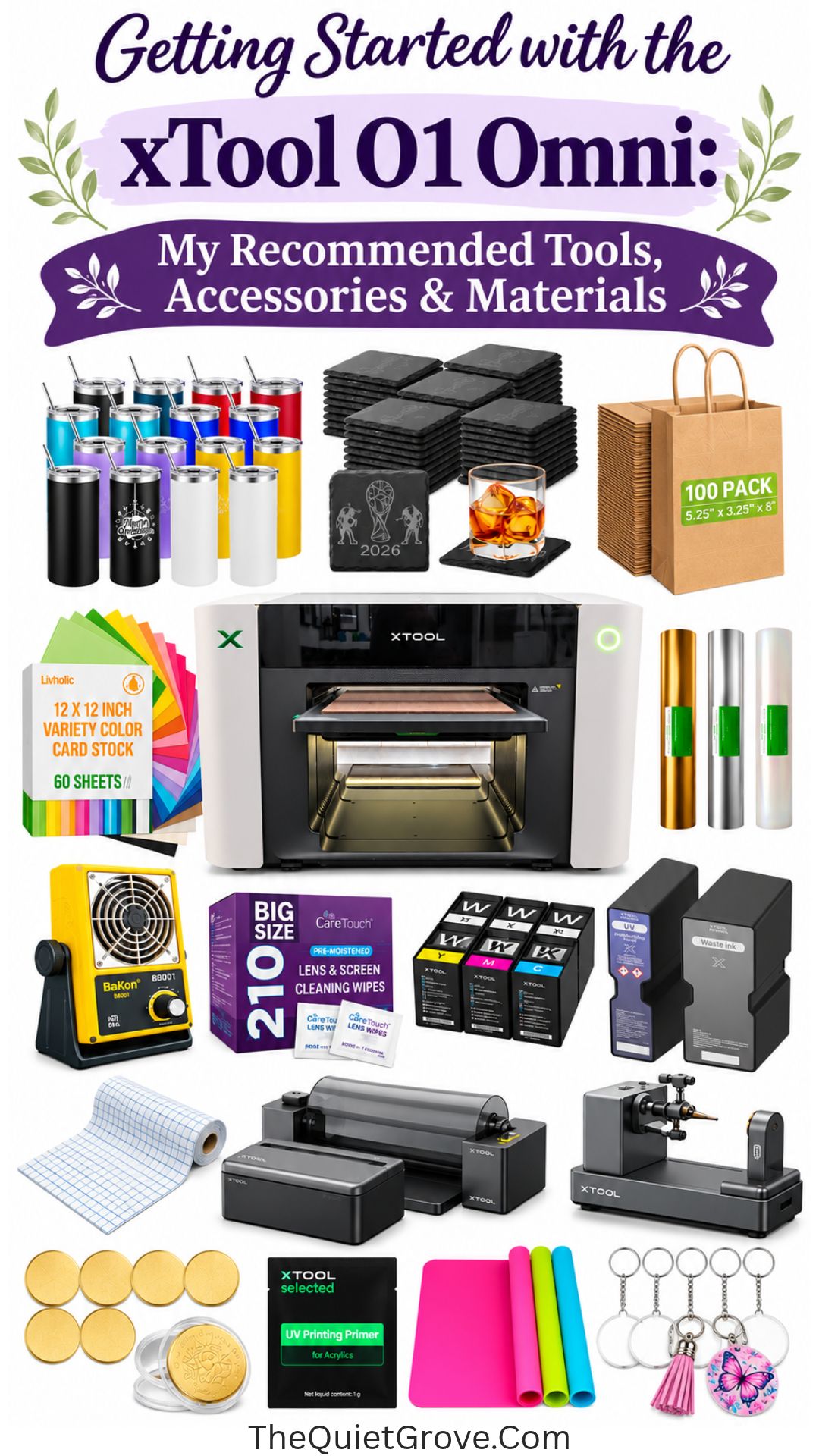
Getting Started with the xTool O1 Omni: My Recommended Tools, Accessories & Materials
(This article was sponsored by xTool. However, the views and opinions expressed are entirely my own,)

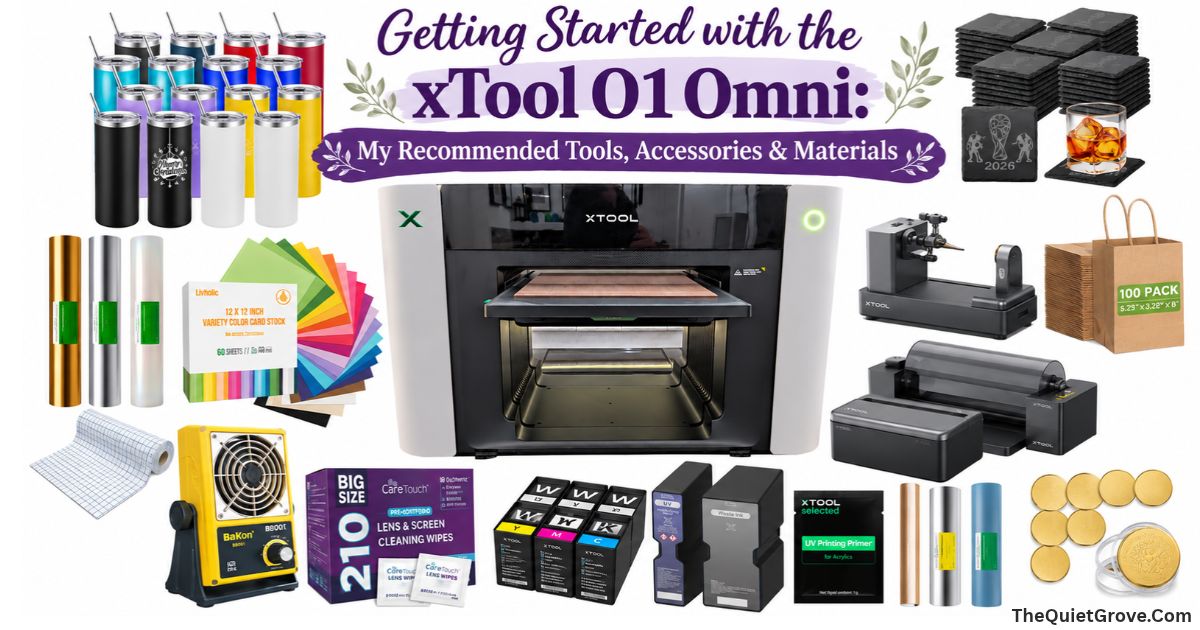
Just got an xTool O1 Omni or thinking about getting one? Here are some of my favorite tools, accessories, and materials to help you get started with UV printing!
Have you heard about the new xTool O1 Omni UV Printers? xTool recently came out with its own line of UV printers, and let me tell you, they are seriously impressive!
If you're not familiar with UV printing, it takes printing to a whole new level! In addition to printing on traditional materials like paper and cardstock, the xTool O1 Omni can print directly onto wood, metal, glass, ceramic, acrylic, leather, canvas, and so much more! With the right accessories, you can even print directly onto tumblers and mugs, create permanent UV DTF transfers to apply to a variety of surfaces, and add beautiful foil details to your projects. Seriously, this opens up so many new creative possibilities for hobbyists and small business owners alike!
I've had my xTool O1 Omni for a while now, and I am continually blown away by what I can do with it. Not only has it been fun to experiment with different materials and printing techniques, but it is also allowing me to take my small business to a whole new level. And I feel like I've only scratched the surface of what this machine can do!
I'll be sharing a full, in-depth review of my xTool O1 Omni soon. There are still a few more materials and projects I want to test before writing my review, so stay tuned for that!
As a side note, xTool is running a special Black Friday Sale where you can get $50 off any of their machines (including the O1 Omni --> HERE) with the code: XTOOLGIFT50
In the meantime, I thought it would be fun to share some of my recommendations for getting started with the O1 Omni. After all, as with any new crafting machine, figuring out which accessories, tools, supplies, and materials to invest in can be a little overwhelming, especially when you aren't quite sure what you'll actually need or use.
So, whether you've recently gotten an xTool O1 Omni, are thinking about investing in one, or are looking for gift ideas for someone who owns one, here are some of my personal recommendations to help you get started!
Which xTool O1 Omni Printer Do I Recommend?
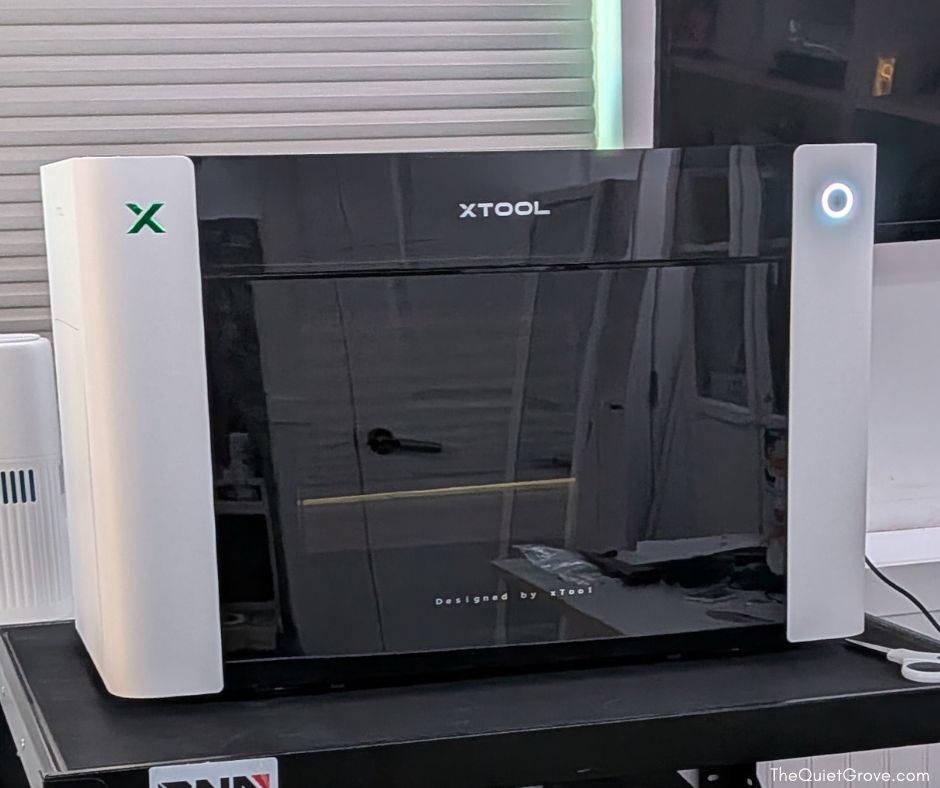
Before we get into my recommendations, let's talk briefly about the printer itself. xTool currently offers three versions of the O1 Omni:
- Single UV: Equipped with standard CMYK, Rigid White UV inks and clear Varnish, this is a great option for getting started with UV printing.
- Dual UV: Features an additional print head with a larger-capacity Rigid White ink cartridge, Flexible White ink, and Red and Yellow Fluorescent UV inks.
- UV+DT: Combines traditional UV printing capabilities (of the Single UV) with a second print head and Ink designed for garment printing.
I personally chose the xTool O1 Omni Dual UV Printer because it offered the most flexibility for the types of UV printing projects I wanted to create.
I love having the additional Rigid White ink for creating layered, raised, and textured designs, as well as the Flexible White ink for printing on non-rigid materials like cardstock, canvas, and leather. For me, the fluorescent inks were more of a fun bonus, though I can definitely see myself incorporating them into more projects in the future!
While the garment-printing capabilities of the UV+DT version are certainly appealing, I currently use a print-on-demand company to handle the apparel I sell in my shop. I wasn't looking to take on garment printing myself or invest in the additional equipment, such as a curing oven, needed for DTF printing. For my small business, having more flexibility with UV printing was the bigger draw.
While many of the items I'm recommending in this guide can be used with all three versions of the O1 Omni, my recommendations are based on my personal experience with the Dual UV Printer.
Now, do you need everything on this list to get started? Absolutely not! A lot will depend on the types of projects you want to create. However, these are some of the accessories, tools, supplies, and materials I recommend checking out to help you get the most out of your new xTool O1 Omni!
xTool O1 Omni Dual Head UV Printer Gift Guide

O1 Omni UV Ink
While you can create quite a few projects with the ink that comes with your xTool O1 Omni, depending on the types of projects you're making, you may find yourself going through certain inks faster than you expected (especially if you love creating layered and textured designs like I do!).
You may also go through more ink if you frequently go several days between using your printer. When your Omni goes into Sleep Mode, it uses moisturizing fluid to help protect the print heads. When you wake your printer back up, it has to flush out that protective fluid and restore normal ink flow before you can start printing again.
The O1 Omni ink cartridges have a 12-month shelf life, so I recommend ordering some extra ink to have on hand rather than waiting until you're about to run out. You can order then in sets or individually.
At the time of writing this article, many of the O1 Omni inks are on backorder (especially the white inks). While xTool is working hard to fulfill those orders, there may still be a bit of a wait. So, if you know you're going to need more ink, I wouldn't wait too long to order it!

UV Maintenance Tank for O1 Omni Printer
This may not be the most exciting item on the list, but it's definitely one worth having on hand!
The xTool O1 Omni Maintenance Tank Kit includes a replacement ink waste cartridge and moisturizing fluid (just be aware you will need to order 2 for the dual UV since it uses a moisturizing liquid cartridge for each print head) , both of which are important for keeping your printer functioning properly and protecting your print heads.
While your O1 Omni comes with an extra ink waste cartridge, it doesn't come with extra moisturizing fluid. I recommend having a backup maintenance kit on hand so you don't have to put your crafting projects on hold while waiting for a replacement.

xTool LM1 Laminator or the O1 Omni
If you're planning on creating UV DTF stickers or adding beautiful foil accents to your projects, you'll want to invest in the xTool O1 Omni Laminator.
The laminator is designed to hold rolls of Hot Stamping Foil or UV DTF B Film, making it easy to incorporate these specialty materials into your projects. What I especially love is that you aren't limited to thin materials like cardstock. The laminator can accommodate materials up to 0.31 inches (approximately 8 mm) thick, including wood and acrylic.
Just think of all the fun possibilities! From custom UV DTF stickers for packaging and drinkware to beautifully foiled gift tags, ornaments, signs, and more!

xTool RF1 Roll Feeder for O1 Omni Printer
If you're planning on making a lot of UV DTF stickers, especially for things like custom packaging, paper gift bags, drinkware, or products for your small business, I highly recommend getting the O1 Omni Roll Feeder to use alongside your laminator. ** While you can use the Laminator on its own, you have to have the laminator to use the roll feeder.
While you can certainly create UV DTF stickers using individual sheets of film and the laminator without the Roll Feeder, the Roll Feeder makes it much easier to batch your projects and print multiple designs in one go.
There is a little bit of material waste when you initially feed the film through the Roll Feeder and Laminator. However, if you're planning on printing larger batches of designs, the added efficiency is well worth it!

Want to print directly onto tumblers, mugs, pens, and other cylindrical objects? Then you'll definitely want to check out the xTool OR1 Rotary Attachment!
While you can create UV DTF transfers to apply to many of these same items, having the ability to print directly onto cylindrical surfaces opens up even more creative possibilities.
I've used my Rotary Attachment to print on tumblers, and I love being able to create personalized, full-color designs on these items. **Though I have found for full wrap designs it is faster to just do a UV DTF permanent sticker than printing directly to the tumbler.
Whether you're making personalized gifts for family and friends, creating branded merchandise for businesses, or expanding the products you offer in your own small business, the Rotary Attachment is a great accessory to have!

Pre-Moistened Glasses Wipes
One important part of owning an xTool O1 Omni is keeping up with its regular maintenance, which includes cleaning the optical lenses, scanner surfaces, and sensor bars.
Keeping these areas clean helps ensure that your printer can accurately scan your materials and properly align your designs.
I recommend keeping some appropriate lint-free lens cleaning wipes and soft, lint-free cloths on hand for this purpose. Just make sure you're following xTool's cleaning instructions for each component, including using a dry lint-free cloth afterward where recommended

Anti- Static Ion Fan
If you're planning on using the Gloss Varnish setting on your O1 Omni, I highly recommend investing in an Anti-Static Ion Fan.
Static can mess with your UV printer. Additionally, dust particles can be particularly frustrating when working with gloss varnish because even tiny particles can leave noticeable imperfections in your otherwise beautiful glossy finish.
An Ion Fan helps neutralize static electricity, making it easier to remove dust particles from your materials and printing area before you start printing.
This is the Ion Fan I personally use to help remove dust before working on any projects that utilize the Gloss Varnish setting. It's a simple extra step that can make a big difference in the finished look of your projects!

ELEGOO MARSMATE Air Purifier, Remove Up to 95% TVOC
The xTool O1 Omni comes equipped with a built-in dual-layer filtration system that utilizes both HEPA and activated carbon filters. According to xTool, this system can remove up to 96.4% of Total Volatile Organic Compounds (TVOCs) under closed-door operating conditions.
However, there are certain projects, such as those utilizing the large printing bed or the Roll Feeder, that require you to operate your printer with the doors open.
If you're using your O1 Omni in your home like I am, I recommend investing in a good air purifier with a substantial activated carbon filter as an additional precaution, alongside proper ventilation and any external extraction recommended by xTool.
An activated carbon air purifier or an air purifier made for use with resin, like this one from Elegoo. It can also help reduce lingering odors, including the smell of the moisturizing fluid when your printer is in Sleep or Vacation Mode.

UV Printing Primer Wipe for O1 Omni Printer
If you're planning on printing directly onto smooth, non-porous materials like metal, acrylic, glass, or ceramic, I highly recommend getting some Adhesion Promoter Wipes.
Properly prepping these materials before printing helps the UV ink adhere to the surface, making your finished designs more durable and less likely to scratch, chip, or peel off.
I personally use xTool's Adhesion Promoter Wipes and have been really happy with the results. They offer three different types of wipes: Metal, Acrylic, and Glass & Ceramic. Just make sure you're using the appropriate wipe for the material you're printing on.
The wipes come in boxes of 50 and are individually wrapped. One little tip to help make them last longer is to prep several blanks at the same time. For example, when I'm making custom coins or acrylic ornaments, I'll prep multiple blanks with a single wipe rather than opening a new one for each blank.

Laser Jig Templates
Free laser jig templates for aligning and holding items during engraving. Position pens, tumblers, coasters, and small parts accurately and repeatably.

Here's a little tip for keeping your O1 Omni adhesive mats clean!
UV ink will adhere to and harden on your adhesive mats. While this isn't usually an issue when you're printing a design in the center of a blank, it can become a problem when you're printing edge-to-edge designs and some of the ink ends up extending beyond your material.
There are a couple of ways you can help protect your mats. One option is to purchase thin silicone sheets and cut them down to fit your printing mats. Cured UV ink generally releases more easily from silicone surfaces.
Another option (and the one I personally use) is clear vinyl contact paper!
I purchased a whole roll of clear contact paper and simply cut off a piece whenever I need it. I place it on my adhesive mat with the sticky side facing up. This holds my materials in place while protecting the adhesive mat underneath from any excess ink.
When I'm done printing, I simply peel off the contact paper and throw it away, leaving my original adhesive mat clean and sticky for my next project.
It's an inexpensive way to help extend the life of your adhesive mats! And if you do eventually need to replace your mats, xTool has replacement mats available on its website.

12x12 Heavy Cardstock
If you have the new xTool C1 Craft Machine or another cutting machine like a Cricut or Silhouette, pairing it with the O1 Omni opens up so many fun possibilities for paper crafting!
You can use your cutting machine to cut out banners, gift tags, bookmarks, cards, and other fun paper projects from heavy cardstock, then use your O1 Omni to print beautiful full-color designs and even add foil accents.
One of my favorite things about UV printing on cardstock is that you aren't limited to light-colored cardstock like you typically are with a traditional printer.
I recently made a fun gothic bookish Halloween banner using black heavy cardstock, and I absolutely loved how it turned out! Normally, you wouldn't be able to print a vibrant full-color design directly onto black cardstock with a regular printer. However, with the O1 Omni, you can print a layer of white ink underneath your color design, and all of a sudden, those colors really POP!
If you enjoy paper crafting, especially if you already own a cutting machine, I definitely recommend experimenting with heavy cardstock and your O1 Omni.

3mm Basswood
As someone who already does a LOT of wood crafting with my xTool laser cutting machines, I was particularly excited to see how well the O1 Omni would print on wood. And much to my delight, it prints beautifully on basswood!
I've printed on both natural basswood and basswood that I've painted with acrylic paint, and I've been really happy with the results. I haven't even needed to use an adhesion promoter on the basswood projects I've made so far!
What I especially love is being able to combine my laser cutting and UV printing capabilities. While I still love the look of traditional laser-cut and engraved wood projects, being able to add vibrant, full-color designs to my laser-cut pieces has opened up a whole new world of creative possibilities.
From custom ornaments and home decor to layered signs, advent calendars, and personalized gifts, there are so many fun ways to combine these two crafting technologies!
If you already own a laser cutting machine, basswood is definitely one of the first materials I recommend experimenting with on your O1 Omni.

UV DTF A/B Film Roll Set for O1 Omni Printer
If you're investing in the xTool O1 Omni Laminator or Roll Feeder with plans to create UV DTF stickers, don't forget to stock up on compatible UV DTF A & B Film!
The A Film is what you print your design onto, while the B Film is applied using the laminator to create a transfer that you can then apply to your desired surface.
What I love about UV DTF stickers is that they allow you to customize items that might otherwise be difficult or even impossible to print directly on with your Omni.
They're great for customizing drinkware, gift bags, packaging, glass jars, and so much more!
You can work with individual sheets of film if you're only using the Laminator, or purchase compatible rolls if you're planning on using the Roll Feeder to batch your designs.

Hot Stamping Foil for O1 Omni Printer (100m)
If you're getting the xTool O1 Omni Laminator, I definitely recommend picking up some Hot Stamping Foil rolls as well!
I love the look of metallic foil accents on crafting projects. There's just something about adding a little gold or silver detail to a design that makes it feel extra special!
With the O1 Omni and Laminator, you can add foil accents to a variety of compatible materials, including cardstock, wood, and acrylic.
Just think of all the beautiful foiled gift tags, bookmarks, greeting cards, ornaments, invitations, and home decor projects you could create!
Foil rolls are also a fun and relatively inexpensive gift idea for someone who already owns an O1 Omni and Laminator. I'd recommend starting with some classic gold and silver foil and then branching out into other colors and specialty finishes as you experiment with different projects.

Clear Acrylic Keychains & Ornaments
Another material I've really enjoyed working with is clear acrylic. I've used my O1 Omni to create some adorable acrylic keychains and acrylic ornaments, and I love that you can take advantage of the transparency of the acrylic to create designs that can be viewed from both sides.
When creating double-sided designs on clear acrylic, I like to print my designs in two stages on the same side of the acrylic.
First, I mirror my design and print it using color only so that the design looks correct when viewed through the acrylic. Then, I print two layers of white ink followed by my full-color design in its normal orientation. The white ink provides an opaque backing between the two color prints, allowing the design to look vibrant from both sides.
This technique is especially fun for personalized keychains, Christmas ornaments, bag charms, and other small gifts!

40mm Brass Challenge Coin Blanks
If you've been following me on social media, you've probably seen some of the custom coins I've been making with my O1 Omni. Seriously, I LOVE how beautifully this printer prints on metal coins!
One of my favorite ways to create custom coins is to upload my design into xTool's Depth Map & Relief Generator on Atomm. For just 12 Atomm credits, it generates a depth map that I can use with my design to create a dimensional, 3D relief print.
I've experimented with both matte and gloss varnish finishes on my coins, and I honestly love both for different reasons. The matte finish really highlights the texture and dimensional details of the design, while the gloss finish still showcases the 3D relief but gives the coin a beautiful, polished, professional-looking finish.
You can purchase blank metal coins directly from xTool, on Amazon, or even in bulk from Alibaba. I've purchased coins from all three and have been happy with the results. If you're planning on making coins to sell as part of your small business, purchasing them in bulk can be considerably more cost-effective.
Just remember to properly prep your metal coins with an appropriate adhesion promoter before printing!

Kraft Paper Gift Bags
If you're planning on experimenting with UV DTF stickers, I highly recommend picking up some plain kraft paper gift bags!
One of the things I love about UV DTF transfers is that you can use them to customize items that aren't necessarily ideal for direct UV printing. Kraft paper gift bags are a great example of this, especially with all their folds, seams, and uneven surfaces.
Rather than trying to position the entire bag in my printer, I can simply print my designs onto UV DTF film and then apply the finished transfers to the bags.
This is such a fun way to create custom gift bags for birthdays, Christmas, weddings, parties, and other special occasions!
It's also a fantastic option for small business owners who want to create their own branded packaging. Instead of spending a lot of money ordering custom-printed bags, you can purchase plain kraft paper bags in bulk and create your own branded UV DTF transfers to customize them as needed.
It's a relatively inexpensive way to add that extra special, professional touch to your packaging!

Slate Coasters
Another material I've really enjoyed printing on with my O1 Omni is slate!
I've always loved the natural, rustic look of slate coasters, and being able to add beautiful full-color designs to them opens up so many fun possibilities.
One of the great things about the O1 Omni is that you can print a layer of white ink underneath your color design, allowing those colors to really stand out against the naturally dark surface of the slate.
You can create everything from personalized monogrammed coasters and beautiful seasonal designs to custom illustrations, family keepsakes, and branded coasters for businesses.
Slate coaster sets make wonderful gifts for weddings, housewarmings, Christmas, and other special occasions. They're also a great product to offer if you have a small crafting business!

Stainless Steel Drink Tumblers
If you're getting the Rotary Attachment for your O1 Omni, you'll definitely want to pick up some blank tumblers to experiment with!
I love that you can use the Omni to print full-color designs directly onto compatible tumblers without being limited to sublimation-coated blanks. Depending on the surface of your tumbler, you may need to use an appropriate adhesion promoter before printing.
You can create personalized tumblers featuring names, illustrations, fun sayings, business logos, and more. You can even experiment with adding dimensional details to your designs using layered UV printing!
Of course, you can also use your O1 Omni to create UV DTF transfers to apply to tumblers if you don't have the Rotary Attachment or prefer that method of customization.
Personalized tumblers are always a popular gift, and having multiple ways to customize them with the Omni is definitely a plus!
So Many Creative Possibilities!
I hope you've found these recommendations helpful! Whether you're just getting started with your xTool O1 Omni, are considering investing in one, or are shopping for gifts for someone who owns one, there are so many fun accessories, tools, and materials to choose from.
Remember, you don't need to get everything on this list right away. I recommend starting with the accessories and materials that will be most useful for the types of projects you want to create and then adding to your collection as you go.
One of the things I love most about crafting is experimenting with new materials and techniques. I can't tell you how many times since getting my O1 Omni I've looked at something and thought, "Ooh, I wonder if I could UV print on that!" I already have a growing list of projects I want to try, and I'm excited to see what else I can create with this machine.
Be sure to check back here at The Quiet Grove, as I'll be sharing more UV printing tutorials, tips, and project ideas, as well as my full review of the xTool O1 Omni Dual UV Printer!
Do you already own an O1 Omni? I'd love to hear what your favorite accessories and materials are or what projects you've been having fun creating. Let me know in the comments below!
If you liked this post, then check out these: (click on the photo to go to the post)