
Are you looking for information about the Cricut Joy?

Cricut’s CEO just announced the newest member of the Cricut Family the new Cricut Joy. This compact and portable machine is the perfect companion machine for those who already have Cricut Explore or Cricut Maker machines while it cannot cut as many materials as the Cricut Air or Maker it is a lot easier to pull out to do quick and easy projects or to transport for crafting on the go.

The Joy is also a great starter machine for those who mainly want a Cricut for smaller easier projects like cards, labels, tags, mugs, signs decals, coasters and custom clothing.

Ever since the announcement of the Cricut Joy was made the internet has been on fire with questions from crafters about this new crafting machine. Here are the answers to the top 20 Cricut Joy Questions:

1. When Will The Cricut Joy be Available to Purchase?
The Cricut Joy and associated tools & materials will be available to purchase come March 1st
2. Where Can I Purchase a Cricut Joy?
You will be able to purchase a Cricut Joy -->HERE<-- on Cricut.com as well as at all their partner stores (Michaels, JoAnns, Hobby Lobby, Walmart...)
3. Why Do The Cricut Joy, Materials & Accessories Say They Are Out Of Stock on Cricut.com?
As soon as Cricut's CEO made the announcement about the Cricut Joy their website store showed the product listing for the machine, materials & accessories to show what will be available come March 1st.
Since the product is not officially available yet each listing shows Out of Stock this will be changed once they are available for purchase.
4. How Much Does the Cricut Joy Cost?
The Cricut Joy retail price is set at $179.99
5. What Comes With The Cricut Joy?
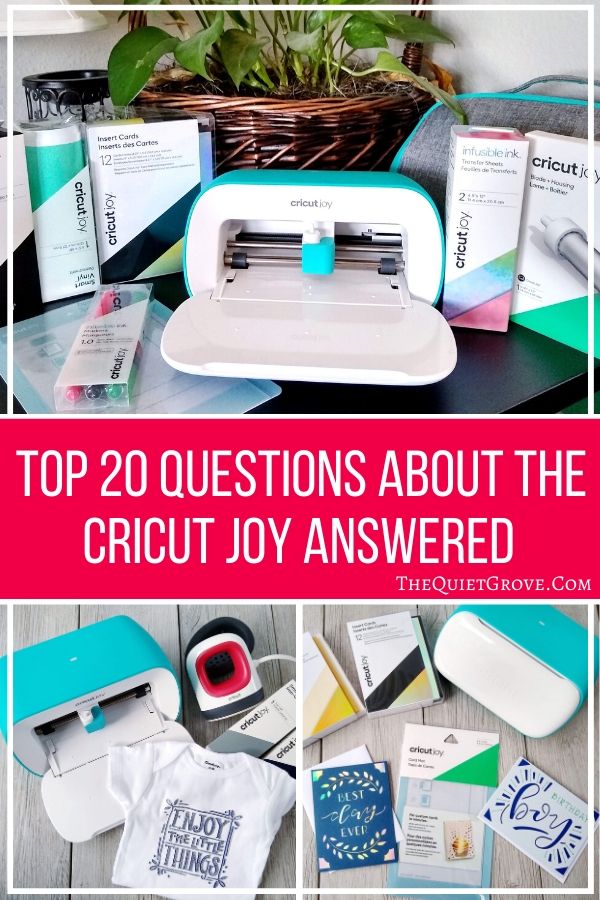
The Cricut Joy comes with: Blade + Housing, Fine Point Pen, Black (0.4 mm), StandardGrip Mat, 4.5" x 8.5" (11.4 cm x 16.5 cm), Welcome card, Power adapter, Materials for a practice cut & Free trial membership to Cricut Access™ (for new subscribers)
6. Does the Cricut Joy Come In More Than One Color?
No. At this time the Cricut Joy only comes in one color option: Teal & White
7. What Materials Will Be Available For The Cricut Joy?
Smart Vinyl, Transfer Tape, Smart Iron-on, Smart Labels, Adhesive-Backed Paper, Infusible Ink Sheets, Infusible Ink Pens, Fine Point Pens, Gel Pens & Insert Card sets.
*Each of these materials comes in a variety of colors and patterns.
8. What Tools & Accessories Are Available For The Cricut Joy?
In addition to a wide variety of materials, Cricut will also have available tools & Accessories for the Cricut Joy when released. Here is the current list: A Cricut Joy Tote , 4.5x12 in Mats (Light grip & Standard Grip Mats), Cricut Card Mat, Replacement Blade & Housing, Starter Tool Set
9. What Materials Can Be Used Without A Mat?
Cricut's Smart Vinyl, Smart Iron-on & Smart Labels do not need a mat.
Infusible Ink, Paper Materials, Insert Cards & Scraps do require a mat
10. Can I Use Materials Not Made For The Cricut Joy?
You can pretty much use any material that can be cut with a fine point blade. However, if you are using a material not specifically made for the Cricut Joy (like Cardstock) You will need to cut it down to fit and use it with a mat.
11. Can You Use Pens/Blades From Cricut's Other Machines With The Cricut Joy?
No. Due to the compact size of the Cricut Joy, it has a specially sized blade & housing as well as pens.
12. Does The Cricut Joy Require A Different Design Space?
No. the Cricut Joy uses the same Cricut Design Space.
13. Does The Cricut Joy Require An Internet Connection to Work?
You will need to be connected to the Internet initially to install the Cricut Software and set up your machine. However, if you are using Design Space for Desktop or for iOS, then you also have the option to work offline.
14. Does The Cricut Joy Come With Any Free Fonts And Designs?
Yes! Your Cricut Joy comes with 50 ready-to-make projects to get you started. How cool is that?!? Plus all Design space users have access to additional fonts, images, and ready-to-make projects at no charge.
15. Does the Cricut Joy Have a Battery or a Power Cord
The Cricut Joy uses a Power Cord.
16. Does The Cricut Joy Have a Cable To Connect With Your Computer?
No. The Cricut Joy works wirelessly via Bluetooth
17. What Devices Can You Use The Cricut Joy With?
The Cricut Joy is Compatible to work with compatible Computers( Windows or Mac), Tablets & Phone (Apple &Android)
18. How Long A Design Can the Cricut Joy Cut?
With Smart materials, you can cut continuous image up to 4.25” wide and 4 ft long or repeated shapes up to 20 ft
With a cutting mat, you can cut up to 4.25 inches x 6.25 inches, or 4.25 inches x 11.75 inches.
19. Can I use Any Pens With The Smart Labels?
Cricut Joy's Smart Labels were designed to be used only with the Fine Point Pens. These pens work extremely well with the smart labels drying almost instantly with no smearing for an awesome glossy finish.
20. How Do You Load And Cut Materials When There Are No Buttons On The Cricut Joy?
Yes, the Cricut Joy has no buttons. Everything is controlled via Bluetooth from Design Space. After you click to make your project and select if you are using a smart material or a mat, you then click the load button and insert your material or mat into the Cricut Joy. The Cricut Joy Has sensors which will recognize that you have inserted your material/mat and will automatically load it fully into the machine (If you are using a Smart material the Cricut Joy will then quickly scan the full length of your material to make sure you have enough to cut your project. Then you select Go on Design Space for your Cricut to begin cutting/drawing.
Do you still have questions about the Cricut Joy? Ask them in the comments below and I will make sure to answer them for you.
If you like this post, then check out these: (Click on the photo to go to the post)


mj
Saturday 25th of February 2023
bought one last year. will not connect to my phone. Tried all options. Loved using it when it worked ! ???
Julia
Friday 10th of March 2023
Have you tried contacting Cricut's tech support?
Graham
Tuesday 7th of February 2023
Will a Cricut Joy cut 2mm cardboard?
Julia
Wednesday 8th of February 2023
The Joy doesn't have the pressure to cut that. You would need one of their full sized units.
Vicki
Tuesday 15th of March 2022
Every time I start another project after doing one I have to unplug the Cricut joy and reconnect it. Cannot do two projects in a roll. Plus it keeps disconnecting and will sometimes disconnect in a middle of a project. HELP
Julia
Wednesday 16th of March 2022
Oh, no! Thant should not be happening. I would contact Cricut tech support asap to help you fix that.
Krissy Smith Haugh
Wednesday 23rd of February 2022
I have had my Cricket Joy for less than a month and my labels are smearing. I am only uses Cricket Joy fine tip pens and Cricket Joy permanent vinyl. Any ideas?
Julia
Wednesday 23rd of February 2022
I am not sure. I haven't had that happen to me. I would contact Cricut support. They should be able to help you.
Cynthia
Monday 31st of January 2022
What materials can I use that don't require Cricut Access - it seems like literally EVERY material requires paying over $100 a year to even use my machine. Who cares if I can start a project for free if it can't cut into any materials I buy direct from Cricut???
Julia
Monday 31st of January 2022
You don't need Cricut access to cut any materials. Cricut Access is if you want to use any of Cricut's designs/specialty fonts. You can make your own designs in Cricut for free as well as upload designs (that bloggers like I share) for free. as for what materials you cut... Cricut joy materials are sized to fit the joy machine, but with the joy mats you can cut down any materials that can be cut with a fine point blade. (ie paper, cardstock, vinyl, iron-on, infusible ink, sticker label paper, faux leather). Your materials don't even have to be Cricut brand materials.