
Top 20 Questions About The New Cricut Joy Answered

Are you looking for information about the Cricut Joy?

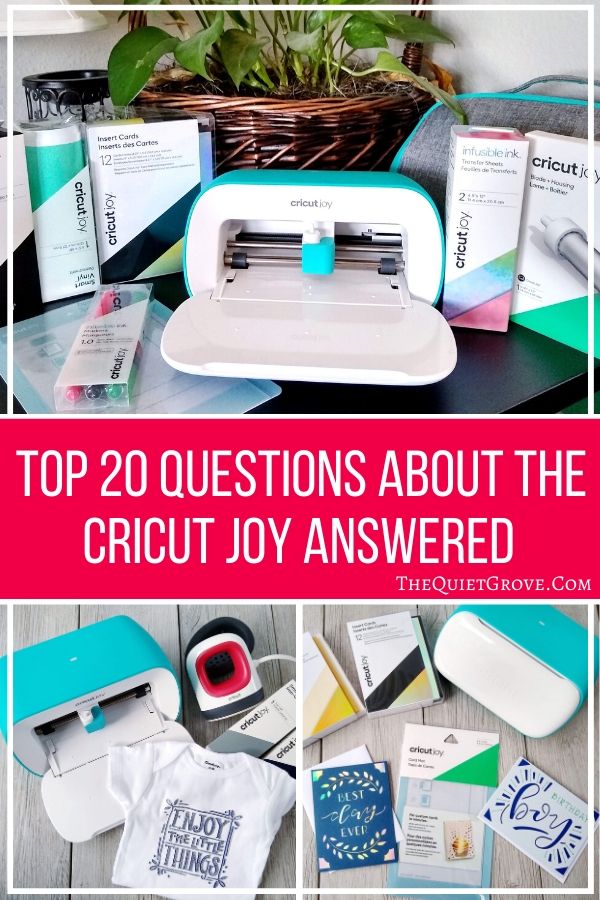
Cricut's CEO just announced the newest member of the Cricut Family the new Cricut Joy. This compact and portable machine is the perfect companion machine for those who already have Cricut Explore or Cricut Maker machines while it cannot cut as many materials as the Cricut Air or Maker it is a lot easier to pull out to do quick and easy projects or to transport for crafting on the go.

The Joy is also a great starter machine for those who mainly want a Cricut for smaller easier projects like cards, labels, tags, mugs, signs decals, coasters and custom clothing.

Ever since the announcement of the Cricut Joy was made the internet has been on fire with questions from crafters about this new crafting machine. Here are the answers to the top 20 Cricut Joy Questions:

1. When Will The Cricut Joy be Available to Purchase?
The Cricut Joy and associated tools & materials will be available to purchase come March 1st
2. Where Can I Purchase a Cricut Joy?
You will be able to purchase a Cricut Joy -->HERE<-- on Cricut.com as well as at all their partner stores (Michaels, JoAnns, Hobby Lobby, Walmart...)
3. Why Do The Cricut Joy, Materials & Accessories Say They Are Out Of Stock on Cricut.com?
As soon as Cricut's CEO made the announcement about the Cricut Joy their website store showed the product listing for the machine, materials & accessories to show what will be available come March 1st.
Since the product is not officially available yet each listing shows Out of Stock this will be changed once they are available for purchase.
4. How Much Does the Cricut Joy Cost?
The Cricut Joy retail price is set at $179.99
5. What Comes With The Cricut Joy?
The Cricut Joy comes with: Blade + Housing, Fine Point Pen, Black (0.4 mm), StandardGrip Mat, 4.5" x 8.5" (11.4 cm x 16.5 cm), Welcome card, Power adapter, Materials for a practice cut & Free trial membership to Cricut Access™ (for new subscribers)
6. Does the Cricut Joy Come In More Than One Color?
No. At this time the Cricut Joy only comes in one color option: Teal & White
7. What Materials Will Be Available For The Cricut Joy?
Smart Vinyl, Transfer Tape, Smart Iron-on, Smart Labels, Adhesive-Backed Paper, Infusible Ink Sheets, Infusible Ink Pens, Fine Point Pens, Gel Pens & Insert Card sets.
*Each of these materials comes in a variety of colors and patterns.
8. What Tools & Accessories Are Available For The Cricut Joy?
In addition to a wide variety of materials, Cricut will also have available tools & Accessories for the Cricut Joy when released. Here is the current list: A Cricut Joy Tote , 4.5x12 in Mats (Light grip & Standard Grip Mats), Cricut Card Mat, Replacement Blade & Housing, Starter Tool Set
9. What Materials Can Be Used Without A Mat?
Cricut's Smart Vinyl, Smart Iron-on & Smart Labels do not need a mat.
Infusible Ink, Paper Materials, Insert Cards & Scraps do require a mat
10. Can I Use Materials Not Made For The Cricut Joy?
You can pretty much use any material that can be cut with a fine point blade. However, if you are using a material not specifically made for the Cricut Joy (like Cardstock) You will need to cut it down to fit and use it with a mat.
11. Can You Use Pens/Blades From Cricut's Other Machines With The Cricut Joy?
No. Due to the compact size of the Cricut Joy, it has a specially sized blade & housing as well as pens.
12. Does The Cricut Joy Require A Different Design Space?
No. the Cricut Joy uses the same Cricut Design Space.
13. Does The Cricut Joy Require An Internet Connection to Work?
You will need to be connected to the Internet initially to install the Cricut Software and set up your machine. However, if you are using Design Space for Desktop or for iOS, then you also have the option to work offline.
14. Does The Cricut Joy Come With Any Free Fonts And Designs?
Yes! Your Cricut Joy comes with 50 ready-to-make projects to get you started. How cool is that?!? Plus all Design space users have access to additional fonts, images, and ready-to-make projects at no charge.
15. Does the Cricut Joy Have a Battery or a Power Cord
The Cricut Joy uses a Power Cord.
16. Does The Cricut Joy Have a Cable To Connect With Your Computer?
No. The Cricut Joy works wirelessly via Bluetooth
17. What Devices Can You Use The Cricut Joy With?
The Cricut Joy is Compatible to work with compatible Computers( Windows or Mac), Tablets & Phone (Apple &Android)
18. How Long A Design Can the Cricut Joy Cut?
With Smart materials, you can cut continuous image up to 4.25” wide and 4 ft long or repeated shapes up to 20 ft
With a cutting mat, you can cut up to 4.25 inches x 6.25 inches, or 4.25 inches x 11.75 inches.
19. Can I use Any Pens With The Smart Labels?
Cricut Joy's Smart Labels were designed to be used only with the Fine Point Pens. These pens work extremely well with the smart labels drying almost instantly with no smearing for an awesome glossy finish.
20. How Do You Load And Cut Materials When There Are No Buttons On The Cricut Joy?
Yes, the Cricut Joy has no buttons. Everything is controlled via Bluetooth from Design Space. After you click to make your project and select if you are using a smart material or a mat, you then click the load button and insert your material or mat into the Cricut Joy. The Cricut Joy Has sensors which will recognize that you have inserted your material/mat and will automatically load it fully into the machine (If you are using a Smart material the Cricut Joy will then quickly scan the full length of your material to make sure you have enough to cut your project. Then you select Go on Design Space for your Cricut to begin cutting/drawing.
Do you still have questions about the Cricut Joy? Ask them in the comments below and I will make sure to answer them for you.
If you like this post, then check out these: (Click on the photo to go to the post)


Will the cricut joy work with out the design space? On my computer only
You have to have Design Space for the Cricut Joy. It is a free program that is compatible with computers (mac & windows) Tablets and SmartPhones (IOS & Android) The desktop version of Design space can be used with or without the internet.
All the projects I'm liking for cards are to be done with the cricut joy. Can I still complete these with my maker?
They only have the card mat and insert card kits made for the Cricut Joy. However you can make cut out cards with your Maker. You just need to look in design space for cut out card designs that include cutting out the full card and the corresponding insert (like the sample project you made when you first set up your Maker.)
I’m about to get the joy
Does it engrave on perplex plastic key chains engraved with symbols does it do it
The Cricut Joy doesn't have the blade tip or actual pressure ability to engrave. It can only draw with it's specialty pens or cut materials with the fine point blade.
Can this make stencils and cut faux leather.
The Cricut Faux leather is cut with the fine point blade so I would assume yes (I haven't tried yet but the joy is supposed to be able to cut any material that can be cut with the fine point blade.) as for stencils if the material can be cut with a fine point blade (like stencil vinyl then yes. You will just need to cut the material to fit the mat.
Can you scan and cut images
The Cricut Joy does not have Print and Cut abilities. However, if you are asking if you can scan in an image on your phone and computer and convert it into a cut file, yes that is done through design space like with all Cricut machines.
Are there more card front designs that do not have the insert cuts on the corners? I have been making cards for years and I like the clean look of just cardstock behind the front cover that has been die cut.
The premade designs that go specifically with the insert card kits have the cut corners since they are made specifically to go with the inserts but I am sure you can find/modify designs to not include them.
It is March 1st and Hobby Lobby doesn't have cricut joy on their website. When will it be available at Hobby Lobby?
As far as I know, the Cricut Joy is now available at all the retail stores that carry Cricut products. Hobby Lobby being among them (though it may only be instore not online at a few of them still.)
Can the joy cut fabric?
The only Cricut that is designed to cut fabric is the Cricut Maker (using the rotary blade) The Cricut Joy can cut any material that uses the fine point blade.
2 questions...will u eventually be offering circuit joy in other colors? And I only want to be able to cut planner stickers ... is that possible with cricut joy?
As of right now, Cricut says they aren't planning on new colors but we will see. As for planner stickers. As for making planner stickers, the Cricut Joy cannot do print and cut, however, it can cut sticker shapes and with the smart labels you can draw designs (with their fine point pens) that you can cut out.
When using Cricut Joy and Design Space, are you able to turn words sideways and end up with say 11” titles for 12x12 scrapbook pages or would you need to fit words across the 4 1/2” and then piece them together?
Yes, you can cut them lengthwise up to 4 feet(Perfect for signs and longer designs.)
How do you turn off the cricut joy? Do you have to unplug it?
yes you have to unplug the machine to turn it off.
When I plugged in the Joy the power light came on. There is no way to turn it off, besides unplugging every time?
Yeah you just need to unplug it each time. It's a good idea not to keep Cricut Machine's plugged in when not in use anyways.
Can you use the cricut joy smart vinyl on a cricut maker?
yes if you put it on a mat to cut. The smart roll matless feature can only work with the Cricut Joy.
Yes can I use all the images on design space with the joy
as long as they are sized to fit the cutting dimensions. Just not the Cricut Joy doesn't not have print and cut capabilities (It can cut and draw)
can you use your laptop for the design space
Yes. I do
I bought a cricut mini joy on ebay...and it didn't came with power supply. I have search to see which is compatible, cause on cricut page they dont answer, and they only sell power supply compatible with cricut maker and cricut explorer. Does the cricut mini joy is compatible with any of those families? I have the machine and all the materials to work with it...I bought a power supply online and it doesn't fits...Havent been able to find information on power supply compatible with this machine...Its frustrating.
I have a simple object in my projects that is only a cut of a vinyl shape. It fits the dimensions of the Joy mat. I tried "make it," and I got a message that said it was not supported by the Joy. What? This is why I bought the Joy...to cut my small designs I use for keychains. I use vinyl. Why would it not work on the Joy?
I really shouldn't be a problem. You should contact Cricut Support. They should be able to help troubleshoot the problem to get it fixed. https://help.cricut.com/hc/en-us/articles/360020316674-Cricut-Contact-Information
Where can I find the free projects you mentioned in question 14?
You should be able to click on the dropdown under projects and select Free with Cricut Joy and the projects should show up. I was informed yesterday they discovered a glitch with the Joy projects not showing up and that they are working to fix that asap.
Is cricut joy dual
Want to use in Sweden with adapter
I am not sure. I would contact Cricut directly to find out. I know they make circuits to sell specifically to sell in Europe which would most likely have the proper plugs etc.
If you are using a logo/design for more than one shirt, do you have to print out multiple logo/design?
Are you talking about iron-on, infusible ink, or making a stencil to use with screen printing?
Does Cricut charge you for using the fonts it sulies with Design Space ?
Cricut offers a selection of free fonts and designs that you can use, and you can use any of the fonts on your computer as well as your own uploaded designs for free. They also have a Cricut Access Subscription with thousands of fonts and designs available that you can pay for.
When do you need to replace the card mat? On some designs my cardstock is not sticking and it messes up the cut
I am not sure. I think Cricut said it was good for at least 2 boxes of insert card kits. S far I have only done 10 cards on mine but it is still good. though just like your normal mats eventually, the stickiness will wear off with use.
I see you say the fine point blade will cut every thing except fabric, does this mean it will cut balsa wood (basswood) as well? I'm about to buy my first cricut and am not sure which to buy. I do have a small project with balsa wood I'd love to do for my wedding.
The Cricut Joy only uses a fine point blade (meaning it can only cut materials that are cut with the fine point blade.)which cuts all the basic materials like Paper, Cardstock, Iron-on and vinyl etc.
Unfortunately, Basswood requires a Knife blade which is only available for the Cricut Maker.
I'm interested in Cricut, the Joy seems affordable. What thickness of cardstock does the Joy use?
The joy can cut all different thicknesses of Cardstock (as well as paper)
can cricut joy be linked to more than one computer?
Yes all the Cricut machines can be linked to multiple computers, tablets & phones. Though only 1 at any given moment.
I use Arches Cold Pressed 140 lb watercolor paper. Does the Cricut Joy take it?
I am able to cut 140 lb Canson XL watercolor paper when testing on the Cricut Joy. You have to select a different material when you cut. I chose glitter paper and it made two passes when cutting. Came out great!
This was a very simple design shape though. Not sure if a complex, finely detailed shape will cut well.
Can you cut felt on the joy?
Sadly no. Felt is a tricky material that requires a social blade to cut and not ruin. You can cut it with a fabric blade on the Air 2 if you put stabilizer on the back of the felt. What you really need to cut felt is the rotary blade which only works on the Maker.
I want to make stickers. designing them first on my ipad pro and then printing them out(so they will be pre printed already and have the same dimensions as the joy mat). then making them cuttable templates(so uploading the outline) for the cricut joy. am i able to do that or would i need to get the cricut maker.
Unfortunately, the Cricut Joy does not have Print & Cut ability. You would need either the Explore Air or Maker to use print and cut to make custom stickers.
How can I get free fount and image for joy I got air 2 can I also use my design from it in design space
You can use the same design space for your Air 2 and Cricut Joy so if it is already on your design space you should be fine.
The instructions say turn machine off before unplugging. How do you do that?
For the Joy you just unplug.
Can you emboss or use dies with a Cricket Joy?
Unfortunately, the Cricut joy can only write and cut.
Hi, can the Joy cut & write on acrylic?
unfortunately no. The Cricut Joy can only cut standard materials that can be cut with the fine point blade. It can only write with specialty joy markers and pens.
Can I repeat a cut with the Joy? TIA
You should be able to just modify the material cutting setting in design space (you do that when you choose the material you are cutting)
New joy works ok until yiu put in paper then it says machine interference and help
Really? That is strange. You Cricut Tech Support. There shouldn't be a problem working with paper.
Do you have to plug and unplug the circut joy to turn it on and off?
Yes
My wife asked me to find information about this. Gonna forward this to her. Thanks for sharing!
You are welcome. If you or your wife have any other questions about the Joy or anything else Cricut, then just let me know.
I have the Cricut joy and set it up I keep tapping the terms and agreement but and it says it’s activated but it keeps going back to the same screen ugg I’m getting frustrated. I paid this much money for it and it’s not working
This should not be happening. I would recommend reaching out to Cricut Tech Support so they can get the issues resolved.
How long does the blade last?
It depends on what materials you are cutting and how many projects you are doing. My blades usually last for a couple months.
I just bought a Cricut joy. I know it comes with the free images but are you able to download business logo and print ?
You could upload a logo to cut out of Vinyl, Iron-on, Infusible Ink or Cardstock, but unfortunately, the Cricut Joy doesn't have print and cut abilities.
Does the cricut Joy have an on/off switch? Or do you just plug it in the back of the machine?
You just plug it in and control it via Design Space. No on/off switch
What causes the light on top to blink? For the last few days after I am finished a project, the white light on top blinks. Any ideas?
I am not sure. I'll see if I can find out.
How small of design or letters will the c.joy cut?
I don't have an exact size because it depends on the font, the intricacy of the design, and the material but it can cut extremely small.